Backpack: Difference between revisions
m Redundant sentence. |
m Removed redundant text. |
||
| Line 1: | Line 1: | ||
{{stub}} | {{stub}} | ||
{{Quotation|'''GLaDOS''' describing Weighted Companion Cubes|Oh well. We have warehouses FULL of the things. Absolutely worthless. I'm happy to get rid of them.|sound=GLaDOS_fizzlecube06.wav}} | |||
{{Quotation|'''GLaDOS''' describing | |||
The '''Backpack''' is a feature introduced in Portal 2 for [[Robot Enrichment]] and is the player's personal inventory for in-game items. Items are kept in individual slots and can be viewed, moved or deleted from within the backpack interface. Items are displayed as pages, with each page displaying 50 items, and initially 6 pages. The Backpack allows the player to manage items used to customize the main characters [[Atlas]] and [[P-body]] (in co-op mode), which includes [[Miscellaneous items]], [[Hats]], [[Skins]], and [[Gestures]]. | The '''Backpack''' is a feature introduced in Portal 2 for [[Robot Enrichment]] and is the player's personal inventory for in-game items. Items are kept in individual slots and can be viewed, moved or deleted from within the backpack interface. Items are displayed as pages, with each page displaying 50 items, and initially 6 pages. The Backpack allows the player to manage items used to customize the main characters [[Atlas]] and [[P-body]] (in co-op mode), which includes [[Miscellaneous items]], [[Hats]], [[Skins]], and [[Gestures]]. | ||
| Line 9: | Line 7: | ||
{{clr}} | {{clr}} | ||
== The Loadout Interface == | == The Loadout Interface == | ||
The loadout screen shows previews of equipped [[Miscellaneous items]], [[Hats]], [[Skins]], and [[Gestures]] for [[P-body]] and [[Atlas]], and allows the player to select new items to attach to either robot. | The loadout screen shows previews of equipped [[Miscellaneous items]], [[Hats]], [[Skins]], and [[Gestures]] for [[P-body]] and [[Atlas]], and allows the player to select new items to attach to either robot. | ||
Revision as of 08:36, 30 April 2011
 | “I can't get over how small you are!” This article is a stub. As such, it is not complete. You can help Portal wiki by expanding it. |
| “ | Oh well. We have warehouses FULL of the things. Absolutely worthless. I'm happy to get rid of them.
— GLaDOS describing Weighted Companion Cubes
|
” |
The Backpack is a feature introduced in Portal 2 for Robot Enrichment and is the player's personal inventory for in-game items. Items are kept in individual slots and can be viewed, moved or deleted from within the backpack interface. Items are displayed as pages, with each page displaying 50 items, and initially 6 pages. The Backpack allows the player to manage items used to customize the main characters Atlas and P-body (in co-op mode), which includes Miscellaneous items, Hats, Skins, and Gestures.
The Backpack was introduced with the launch of Portal 2, in April, 2011.
The Loadout Interface
The loadout screen shows previews of equipped Miscellaneous items, Hats, Skins, and Gestures for P-body and Atlas, and allows the player to select new items to attach to either robot.
Gallery
Interface
-
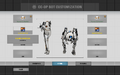 The loadout screen.
 -
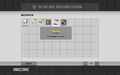 The backpack interface.

