Lista de comandos de consola

From the Portal Wiki
Jump to navigation Jump to search
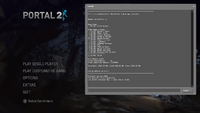
Imagen de la consola del desarrollador en Portal 2.

Desde la consola de desarrollador, se pueden realizar ajustes de jugabilidad y gráficos, así como desactivar algunos valores. La consola se puede activar desde el menú de opciones en la sección de teclado y ratón. Cualquier comando de un archivo «autoexec.cfg» se cargará automáticamente al iniciar el juego.

Comandos cl_

  1. cl_showpos 1 (por defecto: «0»): Puede ser útil para ejecutar o compartir posicionamiento preciso y disparar portales.
  2. cl_drawhud 0 (por defecto: «1»): Trampa del cliente. Desactiva el renderizado del HUD durante la reproducción de una demo .dem.

Comandos r_

  1. r_portal_use_pvs_optimization 0 (por defecto: «1»): Enables an optimization that allows portals to be culled when outside of the PVS
    • Recomendado para hacer speedrun y ver a través de los límites.

sv_cheats 1

sv_cheats 1: Desactiva la capacidad de desbloquear logros o registrar récords del modo desafío. En multijugador lo controla el creador de la partida.

  1. r_drawviewmodel 0/1: Activa o desactiva el modelo de vista en primera persona del jugador.
    • No se puede usar el cvar r_drawviewmodel en multijugador, a menos que el servidor tenga sv_cheats 1 o sea durante una .dem.

Lista de comandos de consola útiles

Escribe sv_cheats 0 o 1 para desactivar o activar las trampas, respectivamente.

  • portal_draw_ghosting 0/1: Toggles the outline visible on portals through walls.
  • mat_fastspecular 0/1: Setting to 0 will improve the quality of specular highlights.
  • r_portal_use_dlights 0/1: Creates a dynamic light where portals are placed; looks aesthetically pleasing.
  • r_waterforcereflectentities 0/1: Force water to reflect everything.
  • gameinstructor_enable 0/1: Toggles the popup hints found throughout the game.
  • sv_player_funnel_into_portals 0/1: Toggles whether the player is 'funnelled' into portals.
  • sv_props_funnel_into_portals 0/1: Toggles whether objects are 'funnelled' into portals.
  • sv_enableholdrotation 0/1: If enabled, objects can be freely rotated with the Portal Device when holding the secondary fire key.
  • cl_fov: Establece el campo de visión deseado.
  • viewmodel_offset_x: Offsets the viewmodel by this much on the x axis.
  • viewmodel_offset_y: Offsets the viewmodel by this much on the y axis.
  • viewmodel_offset_z: Offsets the viewmodel by this much on the z axis.
  • cm_reset_vo_progress: Resets the dialog progress of Cave Johnson in the Perpetual Testing Initiative.

Misceláneos

  • bind <tecla> «<comando>»: Binds a key with a command.
  • unbind <tecla>: unbinds a key
  • kill / explode: Commit suicide.
  • jpeg: Take a jpeg screenshot. Use jpeg_quality # to control the quality level of the resultant screenshots.
  • screenshot: Take a TGA screenshot.
  • find <comando>: a search function that displays all commands with searched term
  • net_graph <1-6>
    • Dependiendo del valor introducido, muestra distinta información, como latencia, FPS, lerp, pérdida de paquetes, etc.
  • changelevel <nombredelmapa>: changes the map without restarting the server.
  • cvarlist: View complete cvar list.
  • differences: Vista
  • exec: Ejecuta el archivo de configuración.
  • map <nombredelmapa>: Cambia el mapa y reinicia el servidor.
  • maps: Muestra la lista de mapas. Usa maps * para una lista completa.

Grabación

  • record <nombre de demo>: Graba una demo. Portal 2 divide demos por mapa (incluyendo el centro) y añade _K como prefijo, empezando por K2.
    • stop: Detiene la grabación de una demo.
  • startmovie <nombredevídeo>: opens up the Source Recorder during demo playback and allows for high quality recording
    • endmovie: Stop recording to image or AVI

NOTA: Videos that exceed the file size of 2 GB become corrupted and unviewable, either use a lower resolution before recording or record to raw images and sound instead!

  • host_framerate <número>: tells the source recorder to record at a constant framerate
  • host_timescale <número>: use in conjunction with host_framerate to produce a smooth video output
Enlaces externos